 Image 1 of 5
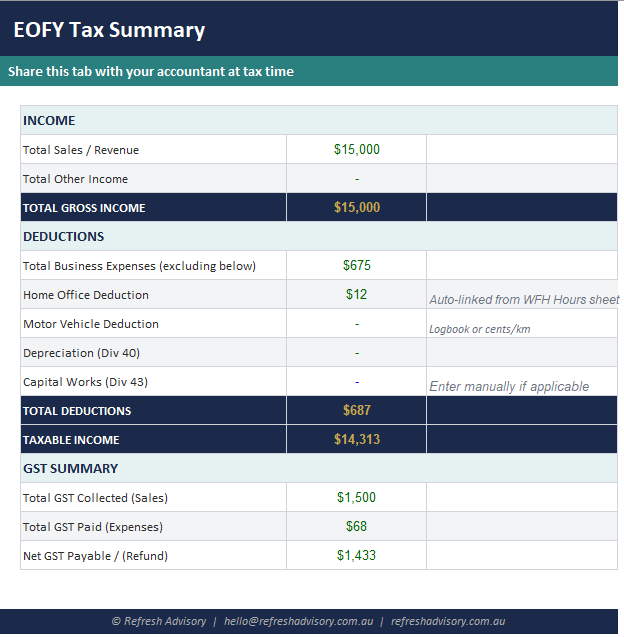 Image 2 of 5
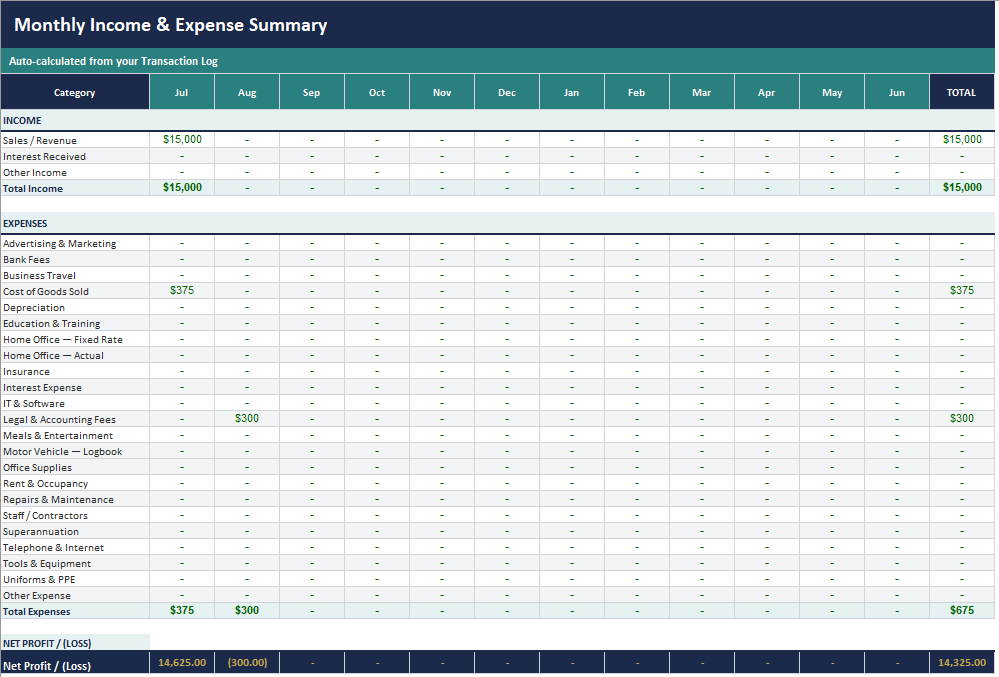 Image 3 of 5
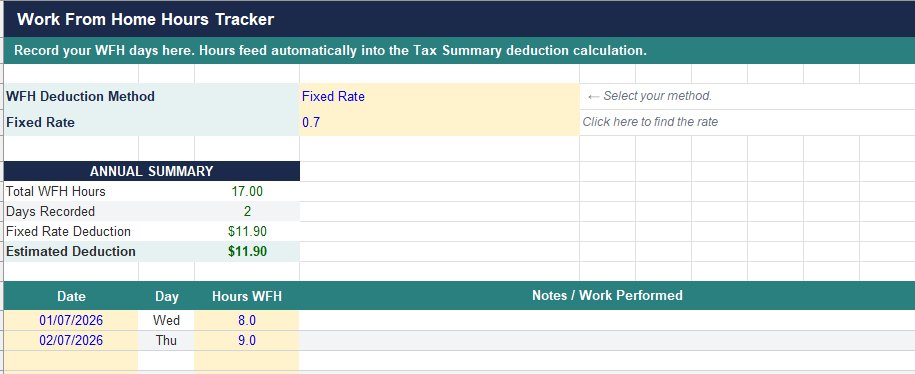 Image 4 of 5
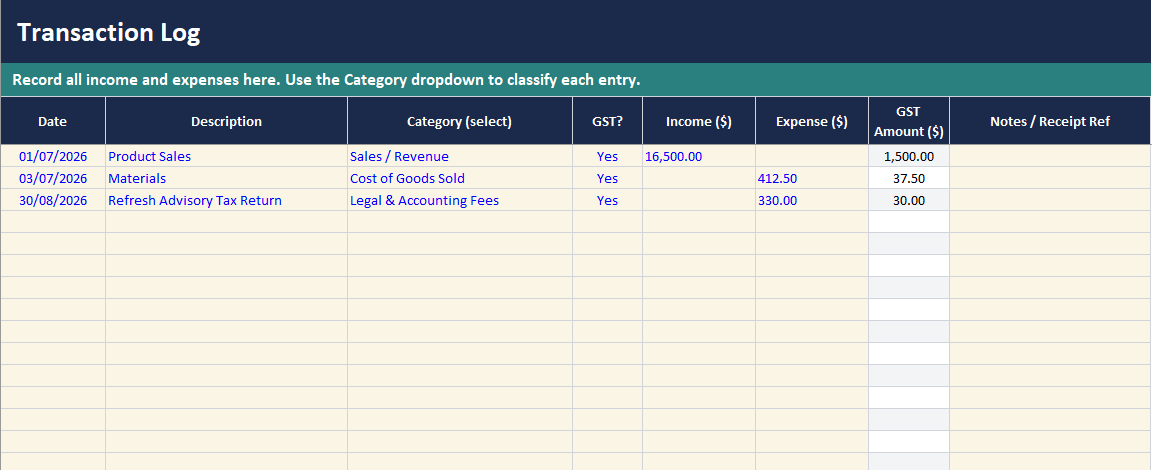 Image 5 of 5
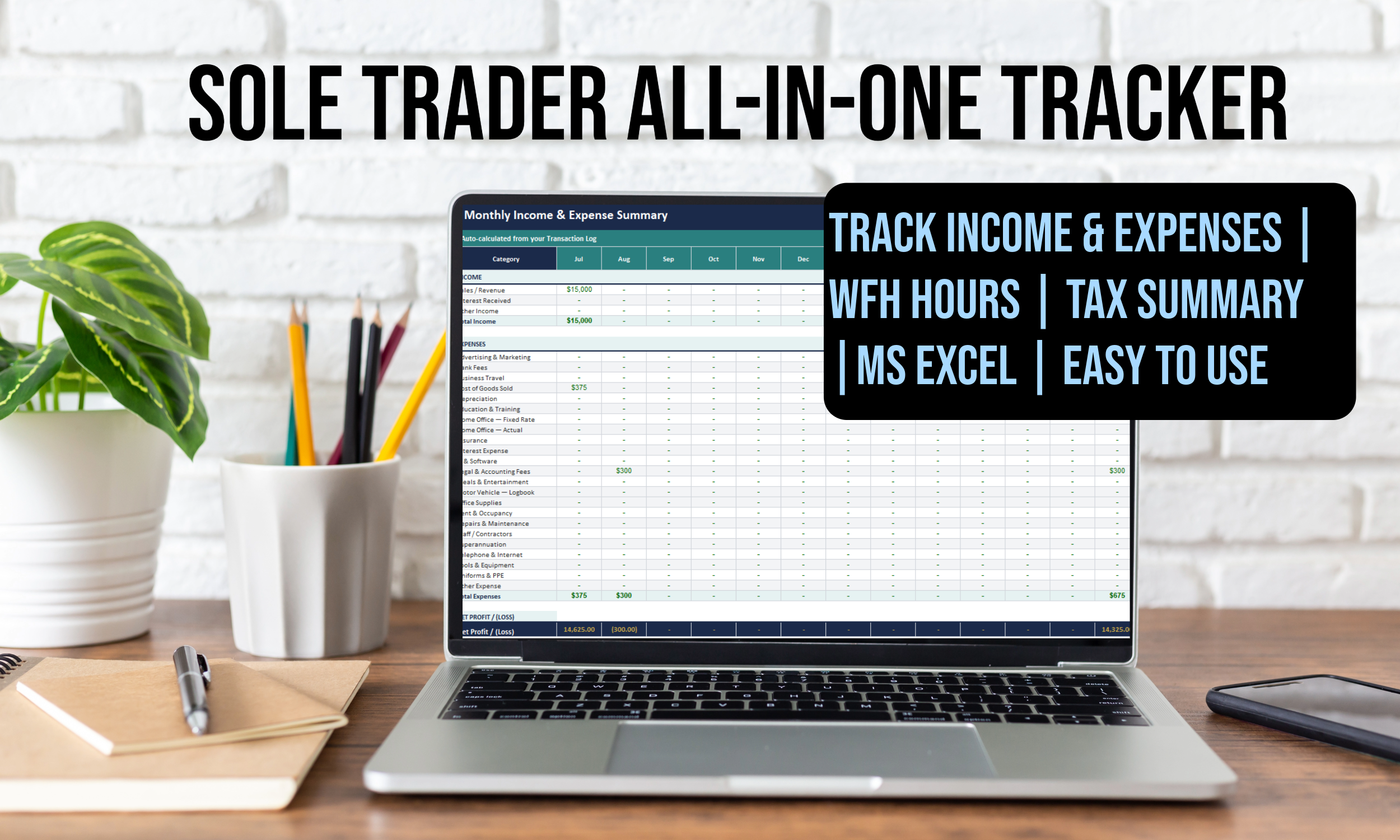
The smarter way to track your income and expenses - built specifically for Australian sole traders and small business owners.
Enter your transactions once and your monthly summaries, GST calculations, and tax-ready figures appear automatically. No accountant required at the end of every month - just at the end of the year.
Six connected tabs - enter data once, everything updates automatically:
• Transaction Log - Record income and expenses with date, category, GST flag, amount, and receipt reference. 500 rows included.
• Monthly Summary - Auto-calculated month-by-month breakdown of all income and expenses across the full financial year. No manual entry required.
• EOFY Tax Summary - A clean, accountant-ready summary of total income, deductions, motor vehicle, depreciation, home office, and net GST. Share this tab at tax time.
• WFH Hours - Track your working-from-home hours to support your home office deduction claim.
• Setup - Enter your business details once - name, ABN, financial year, GST registration. Change the financial year field and the entire tracker recalibrates automatically.
• Instructions - Step-by-step guidance on how to use every part of the tracker.
✔ GST Tracking Built In Mark each transaction as GST applicable or not. All summary figures are automatically shown ex-GST - no manual calculations needed.
✔ Auto Monthly Summary Every transaction flows instantly into a month-by-month breakdown. Income, expenses, and net profit are calculated for each month and as a full-year total.
✔ Dynamic Financial Year Update one cell on the Setup tab and the entire workbook recalibrates to the new financial year. Works for FY2025–26, FY2026–27, and beyond - forever.
✔ Tax Summary for Your Accountant A dedicated EOFY tab pulls everything together: gross income, all deductions broken out by type, motor vehicle, depreciation, and a full GST reconciliation.
✔ Full Category Dropdown 26 ATO-aligned income and expense categories available via dropdown on every transaction row - from Cost of Goods Sold to Motor Vehicle (Logbook) to Superannuation.
✔ Home Office & Motor Vehicle Ready Dedicated rows for home office (fixed rate and actual cost methods) and motor vehicle (logbook method), all auto-linked to the Tax Summary.
Sole Traders & Freelancers
Consultants, tradies, creatives, and anyone operating under their own ABN. Track every dollar in and out, stay GST-compliant, and walk into your accountant's office prepared - not scrambling.
Small Business Owners
If you're not yet at the scale where dedicated accounting software makes sense - or you just want a clean, private, offline record you fully own - this tracker gives you complete visibility without the monthly subscription.
What file format is this?
A Microsoft Excel workbook (.xlsx). Compatible with Excel 2016 and later, Google Sheets, and LibreOffice Calc.
Does it handle GST automatically?
Yes. Mark a transaction as 'Yes' in the GST column and the tracker calculates the GST component and strips it from all summary figures. Your Monthly Summary and Tax Summary always show ex-GST amounts.
How do I use it for a new financial year?
Update the Financial Year field on the Setup tab (e.g. change '2025–26' to '2026–27'). Every formula reads from that one cell - the whole tracker recalibrates instantly. No other changes needed.
Is this a replacement for accounting software?
It's a powerful complement. It's ideal for business owners who want a clear, private, offline record they fully control. Many users run this alongside Xero or MYOB as their own working copy.
What's the refund policy?
Because this is a digital download, all sales are final. If you experience any issues with the file please email us at hello@refreshadvisory.com.au and we'll make it right.
The smarter way to track your income and expenses - built specifically for Australian sole traders and small business owners.
Enter your transactions once and your monthly summaries, GST calculations, and tax-ready figures appear automatically. No accountant required at the end of every month - just at the end of the year.
Six connected tabs - enter data once, everything updates automatically:
• Transaction Log - Record income and expenses with date, category, GST flag, amount, and receipt reference. 500 rows included.
• Monthly Summary - Auto-calculated month-by-month breakdown of all income and expenses across the full financial year. No manual entry required.
• EOFY Tax Summary - A clean, accountant-ready summary of total income, deductions, motor vehicle, depreciation, home office, and net GST. Share this tab at tax time.
• WFH Hours - Track your working-from-home hours to support your home office deduction claim.
• Setup - Enter your business details once - name, ABN, financial year, GST registration. Change the financial year field and the entire tracker recalibrates automatically.
• Instructions - Step-by-step guidance on how to use every part of the tracker.
✔ GST Tracking Built In Mark each transaction as GST applicable or not. All summary figures are automatically shown ex-GST - no manual calculations needed.
✔ Auto Monthly Summary Every transaction flows instantly into a month-by-month breakdown. Income, expenses, and net profit are calculated for each month and as a full-year total.
✔ Dynamic Financial Year Update one cell on the Setup tab and the entire workbook recalibrates to the new financial year. Works for FY2025–26, FY2026–27, and beyond - forever.
✔ Tax Summary for Your Accountant A dedicated EOFY tab pulls everything together: gross income, all deductions broken out by type, motor vehicle, depreciation, and a full GST reconciliation.
✔ Full Category Dropdown 26 ATO-aligned income and expense categories available via dropdown on every transaction row - from Cost of Goods Sold to Motor Vehicle (Logbook) to Superannuation.
✔ Home Office & Motor Vehicle Ready Dedicated rows for home office (fixed rate and actual cost methods) and motor vehicle (logbook method), all auto-linked to the Tax Summary.
Sole Traders & Freelancers
Consultants, tradies, creatives, and anyone operating under their own ABN. Track every dollar in and out, stay GST-compliant, and walk into your accountant's office prepared - not scrambling.
Small Business Owners
If you're not yet at the scale where dedicated accounting software makes sense - or you just want a clean, private, offline record you fully own - this tracker gives you complete visibility without the monthly subscription.
What file format is this?
A Microsoft Excel workbook (.xlsx). Compatible with Excel 2016 and later, Google Sheets, and LibreOffice Calc.
Does it handle GST automatically?
Yes. Mark a transaction as 'Yes' in the GST column and the tracker calculates the GST component and strips it from all summary figures. Your Monthly Summary and Tax Summary always show ex-GST amounts.
How do I use it for a new financial year?
Update the Financial Year field on the Setup tab (e.g. change '2025–26' to '2026–27'). Every formula reads from that one cell - the whole tracker recalibrates instantly. No other changes needed.
Is this a replacement for accounting software?
It's a powerful complement. It's ideal for business owners who want a clear, private, offline record they fully control. Many users run this alongside Xero or MYOB as their own working copy.
What's the refund policy?
Because this is a digital download, all sales are final. If you experience any issues with the file please email us at hello@refreshadvisory.com.au and we'll make it right.